· 13 min read
Why replatform into Drupal and what X to Drupal provides
Why replatforming into Drupal is worth doing, and how X to Drupal reads your live site, derives an architect-grade content model and delivers an editor-ready CMS.
X to Drupal, by QED42
Modernising a website in 2026 means AI inside the CMS, digital sovereignty, an open architecture and readiness for AI agents. X to Drupal is the QED42 harness that gets a finished website there by replatforming it to Drupal 11: the same design, a real content model, AI capabilities wired in, and a handover your content team can act on without a training week. The result is an exportable Drupal CMS for any Drupal 11 host, with no vendor lock-in.
We proved it on our own site first.
From the qed42.com replatform: 569 article bodies moved across, 2,007 images brought into Drupal media, zero custom modules carrying the site.
The acceleration
Acceleration here means one thing: the transcription work of a replatform, reading every page and rebuilding it on Drupal, is done by the harness run, in days. The decisions, the review and the launch stay with people, and they set the pace of everything around the run. Pick the shape closest to your site.
Our own site, measured rather than estimated. Webflow before, Drupal 11 after, and the side-by-side comparison further down this page is the result.
646 pages17 page templates7 forms
From kickoff to go-live, with your team's review and the launch window inside it.
On every run:
These take the time they need, and the plan gives them room:
The measure is the finished build. The harness applies the same modelling rules to every component and every page, each run ends with the new site checked against the live one, and people review the result before it goes live.
None of these is your site. Get in touch and we will come back with what replatforming would mean for yours.
The proof
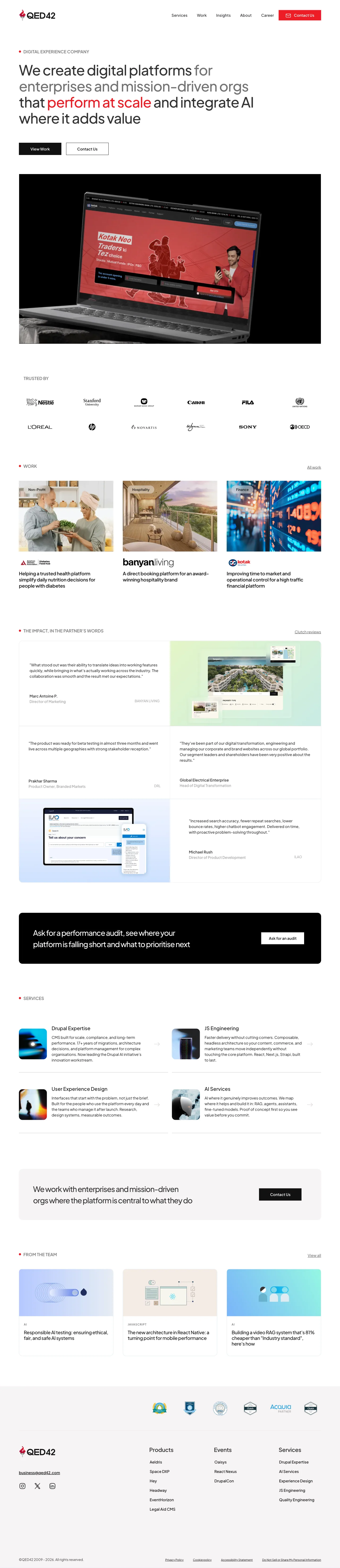
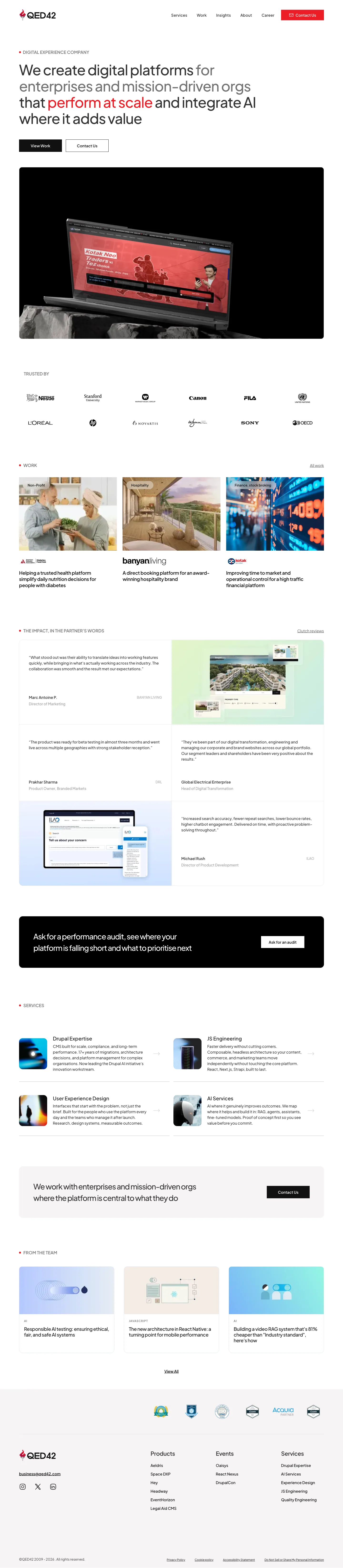
qed42.com ran on Webflow. We pointed X to Drupal at it and shipped the result, and qed42.com now serves that Drupal 11 site. The Webflow original is gone from the address, so the captures below are where the two can still be put next to each other. There is no averaged parity score, because a single number flatters the easy pages. There are the two sites, side by side, at the widths we verify at.
Why replatform
Most teams that come to us are not unhappy with how their website looks. They are stuck behind what the platform underneath it will let them do: no real content model, no way to add AI features, no route to being cited when someone asks a model a question instead of typing it into a search box. Modernising a website in 2026 comes down to four things: AI inside the CMS, digital sovereignty over the site and its content, an open architecture, and readiness for AI agents. Replatforming to Drupal 11 is the step that gets a site there, and it is the reason this harness exists.
Today, on a page editor
Pages, each one edited on its own.
After, on Drupal
One typed record, read by:
How it runs
Step 1
X to Drupal studies your live site the way an architect would: the design system, the components that repeat, the content underneath them, and the listings that tie it together.
Step 2
It lands the site on Drupal 11: a theme that reproduces the design, and a content model with typed components, Views and taxonomies a senior Drupal architect would recognise. Your articles and images migrate into it.
Step 3
Drupal's AI layer is configured against your own provider keys, and the search foundations go on in the same pass: structured data from the content model, metadata, clean paths, redirects, sitemaps, and the surfaces an LLM reads.
Step 4
The result is checked against your live site, side by side, until the differences are boring. Every width your design declares is checked, not only the three we publish, and the check signs in to cover the admin screens your team will use. We publish the comparison and the honest limits, never a score.
Step 5
A phase of its own writes the runbook: the content architecture in plain English, every component shown populated, and where to go to change each part of a page. It hands over as the editorial guide and as the context an assistant reads before it changes anything.
The deliverable is a finished Drupal 11 site, handed over with its configuration, its content and its runbook, installable from scratch as a Recipe.
AI ready on arrival
A growing share of the people looking for what you sell will describe their problem to a model instead of typing keywords into a search box. Being in that answer is a different job from ranking on a results page: the model has to be able to read your site, understand what your organisation is, and have something specific enough to quote. Migrating to Drupal is the moment to fix that, because the content model is being built anyway.
Both of these extend something already on the delivered site rather than being the foundation for it, so nothing above is waiting on them. They stay labelled this way until the day they ship, which is the rule the rest of this page follows.
You can check the machine-readable side on both sites rather than taking it on trust. The Drupal site we delivered serves the four surfaces linked above, and this site serves its own llms.txt, a full-text llms-full.txt and a markdown copy of every article.
What you get
The pixels are what stakeholders look at. What decides whether the move was worth it is what your team can do on the Monday after.
What arrives configured
A replatform is often planned around the pages, with the rest left as assumptions: the editorial setup, the caching, the image handling, the roles, the headers a security review will ask about. Those are the parts that decide whether the site is pleasant to run. They arrive configured, and they are itemised here so you can check each one.
The admin your team actually opens, set up around this site's own content model rather than left at Drupal's defaults.
Configured against your own provider keys, so the capability belongs to your account rather than to a tool we keep hold of.
The parts of a Drupal build that decide what a page weighs and how long it takes, configured rather than left to a later phase.
In place on the site as handed over, not deferred to a hardening phase after launch.
Everything above is configuration on the delivered site, which means it installs with the Recipe and can be read, audited and changed by any Drupal team. None of it is a custom module, and none of it depends on us afterwards. An editorial approval workflow, with review before anything is published, can be added as part of a custom scope.
Everything a replatform includes, and what is scoped separately
Beyond the replatform
A replatform usually ends the way every replatform ends: a training week, a slide deck, and one or two people who know where everything lives. Closing that gap is part of the delivery here. The site arrives documenting itself for the people who will change it, and it arrives reachable, so a change can be described in plain language and staged in the CMS as a draft by someone who has never opened Drupal before.
One
A phase of the run produces a guidebook to the site it has just built, written for someone who does not work in Drupal. Every component is shown populated rather than described, so an editor can see what a section looks like before touching it and can find the screen that produces it. It does the job a training week does, and unlike a training week it is still there in six months.
Two
The delivered site is wired for a Model Context Protocol connection, an open standard that lets an AI assistant work through an application's own interface instead of around it. Your team asks for a page, a component or a copy change, and it arrives in Drupal as a draft built through that content type's own rules, so the metadata, the path and the structured data are filled the way the content type already defines them. Nothing publishes itself.
Three
The run captures the design system it has just reproduced: the colours, the type, the spacing, the components and the rules that hold them together, alongside the voice the existing site is written in. That context is delivered with the site, so a change requested a year later is drafted in your brand rather than in a generic one.
Together these are the difference between a site that is finished and a site that is genuinely handed over. The runbook says where everything is, the connection lets someone change it in plain language, and the brand context keeps what comes back looking like you.
Where it fits
AI site builders and managed SaaS platforms are good at starting over. X to Drupal is for the other case: the site you already invested in is the site you want, modernised on a platform you own.
| Replatform with X to Drupal | Manual replatform | New build on a site builder | |
|---|---|---|---|
| Your current design | Preserved and verified side by side | Recreated by hand from screenshots | Replaced with a new design |
| Your content | Carried into a real content model | Re-entered or scripted per project | Re-entered on the new platform |
| Ownership | Open-source Drupal 11, exportable to any Drupal 11 host | Depends on the target platform | Lives on the vendor's platform |
| Who can maintain it | Any Drupal team, zero custom modules to learn | Whoever built it, at first | The vendor and its ecosystem |
| After handover | A generated runbook, and changes staged in the CMS on request | A training week and a slide deck | The vendor's help centre |
| Who can change it later | Anyone on the content team, in plain language | Whoever was trained on it | Anyone, inside the vendor's editor |
| AI and LLMs | AI layer configured, structured data from the content model | A separate project after the move | Whatever the vendor chooses to expose |
| Where the time goes | The harness does the transcription work | Most of the time is transcription | A new build, plus the content move |
Honest limits
Animation-heavy sections are the hardest thing to reproduce exactly. Where the original leans on motion, the migrated site gets closest to the resting state, and we show you those sections in the comparison instead of cropping them out.
Fidelity varies by page and by viewport, and an average flatters the easy pages. The side-by-side comparison is the claim, and you are free to judge it harshly.
Two items are still in build and say so wherever they appear: deeper AI authoring across an existing library, and a deeper automated SEO audit. Everything else in the AI section is configured on delivery, and the machine-readable surfaces are linked there so you can open them on the site we delivered instead of taking our word for it.
Alternative text is enforced on image fields, the page templates carry landmarks and a working skip link, and delivered pages are swept with the standard automated rule set, with every finding reported against the rule it broke. An automated sweep catches a portion of what an audit would. If you need a conformance statement, that is a separate piece of work and we will say so.
The delivered site ships a consent manager wired to rewrite third-party embeds so they load only after a decision. What it covers is what has been registered with it, which on a given build is a short list rather than everything on the page. It is a working foundation and a launch checklist item, not a finished privacy review.
Components arrive with typed fields and a preview button, and search metadata sits where Drupal editors already look for it. Plain-English help text on every individual field is not complete on the reference build; it is written for new fields as they are generated, and finishing it on an existing build is a small, visible piece of work rather than a hidden one.
The transcription work of a replatform, reading every page and rebuilding it on Drupal, is done by the harness run. The delivery team's hands-on work around it, from scoping to QA and go-live, is planned against your site. Every engagement is scoped against the site's own shape.
A replatform covers the harness run and the delivery team's work around it. Integrations, custom functionality, analytics set-up, hosting and similar work are scoped separately. The full list of what sits on each side of the line is on what a replatform includes.
Questions
X to Drupal is a harness built by QED42 that modernises an existing website on any platform by replatforming it onto a real Drupal CMS. The visual result is preserved, your content migrates across, and the backend is modelled the way a senior Drupal architect would model it: typed components, real listings and taxonomies. It is a paid QED42 offering, delivered as a finished Drupal 11 site that you own and can install on any Drupal 11 host.
A modernisation, and the migration is one step of it. Modernising a website in 2026 means four things: AI inside the CMS, digital sovereignty, an open architecture, and readiness for AI agents. X to Drupal replatforms the site to Drupal 11 and Drupal CMS with the design kept and the content moved into a real content model, and that move is what gets the site to all four. The delivered site ships the Drupal AI module suite with an AI assistant button in the editor, an llms.txt map, a markdown twin of every content page, a read-only JSON:API and robots.txt rules for each named AI crawler. It is handed over as a Drupal Recipe and a database dump that is proven to restore, so it installs on any Drupal 11 host with no vendor lock-in.
A platform instead of a page editor. You get content types and fields, revisions, roles and permissions, media management, and an API over all of it, so your team can publish and extend the site without a developer or a deployment. On top of that the delivered site arrives with Drupal's AI layer configured, structured data emitted from the content model, search foundations carried across, and open-source hosting you choose. The reason most teams replatform is not how the site looks, it is what the current platform will not let them do next.
That is the point of the harness. The design comes across as it is, and we verify the result side by side against your live site at 1440, 768 and 375 pixels wide. We publish the comparison rather than a parity score, because a single number flatters the easy pages. The before and after of our own site is on this page.
They migrate into a real Drupal content model. On our own site that meant 569 article bodies moved across with their formatting intact and 2,007 images brought into Drupal's own media handling. Listings become Drupal Views, categories become taxonomies, and every article becomes a structured node your team can edit.
That is treated as delivery work rather than a later project. The delivered site emits a structured JSON-LD entity graph from the content model, so an assistant reading your pages can tell what your organisation is, what each page is about and how they relate, instead of guessing from markup. It also arrives with the four machine-readable surfaces configured: an llms.txt map of the site, a markdown rendering of every page, read-only JSON for every content item, and named crawl rules for the LLMs. Metadata, clean paths, redirects from your old URLs and sitemaps are configured in the same pass. You do not have to take this on trust: qed42.com is the Drupal site we delivered, and it serves qed42.com/llms.txt, a markdown twin of every page, qed42.com/jsonapi and a robots.txt that names the AI crawlers one by one.
By publishing the same content in formats a machine can consume without scraping. Three things do most of the work: structured data in JSON-LD so entities and relationships are explicit, a plain-text map at llms.txt that tells an assistant what the site is and lists its canonical URLs, and a clean markdown or JSON copy of each page so the prose arrives without navigation, scripts and styling wrapped around it. Migrating to Drupal is the moment to put these in, because the content model that generates them is being built anyway. On a closed platform you usually cannot add them at all.
Drupal's AI module suite is installed and wired to your own model provider keys, so the capability belongs to your CMS and your account rather than to a tool we hold. On delivery that covers assistive authoring inside the editorial experience, alternative text generated for images that were missing it, and page titles, meta descriptions and social metadata drafted per content type from the content itself, with an editor approving rather than starting from a blank field. Two things are still in build and we label them that way: deeper AI authoring across an existing library, such as long-form expansion and summaries applied in bulk, and a deeper automated SEO audit.
You get a runbook instead of a training course. A phase of the run generates a guidebook to the site it has just built, written for someone who does not work in Drupal: the content architecture in plain English, every component shown as it looks once it is populated, where each part of a page comes from and which component holds it, and how to manage taxonomies, menus and listings. It is handed over with the site, so the knowledge does not sit with the one or two people who happened to attend a session, and it is still there six months later when someone new joins.
Yes, and in plain language. The delivered site is wired for a Model Context Protocol connection, an open standard that lets an AI assistant work through an application's own interface rather than around it. Someone on the content team asks for a page, a component or a copy change, and it arrives in Drupal as a draft built through that content type's own rules, so the metadata, the path and the structured data are filled the way the content type already defines them. Nothing publishes itself: the draft stays unpublished, under the site's own roles, until an editor reviews and publishes it.
That is what the brand context is for. The run captures the design system it has just reproduced, the colours, the type, the spacing, the components and the rules that hold them together, alongside the voice the existing site is written in, and hands that over with the site. A change requested a year later is drafted against your own system rather than a generic one, and because it arrives as a draft inside Drupal an editor still sees it before anyone else does.
The harness run itself takes days, and it grows with the size of the site: more pages, page templates and forms make a longer run. Most of the calendar time belongs to people: your team's decisions on what to keep and what to retire, the review of the delivered site on your own pages, and the go-live window, with environments, DNS cutover and a rollback plan. The acceleration section on this page shows four typical site shapes, from a small brochure site to a publisher, each with the length of its harness run and the weeks from kickoff to go-live. For your own site, get in touch through the form on this page and we will come back with what replatforming would mean for yours.
Because on a new platform both the design and the content model have to be recreated by hand, page by page and field by field. The old site works as a reference, and everything else is labour. X to Drupal moves that recreation into the harness run, so the design and the content model come across from the site itself, and the first post in our blog series walks through it in detail.
Search standing is treated as part of the migration. Page metadata, clean paths, redirects from the old URLs, sitemaps and JSON-LD structured data arrive configured on the delivered site rather than left as a to-do list, which is where most replatforming projects lose rankings. The machine-readable surfaces an LLM reads arrive with them, so the site is legible to an assistant on day one rather than after a follow-up project. A deeper automated SEO audit is still in build and we say so plainly rather than counting it as shipped.
Those tools help you build a new site on their platform. X to Drupal migrates the site you already have onto Drupal, an open-source CMS you own and can host anywhere, with the design you already invested in preserved. If your website is an asset rather than a draft, keeping it intact is the difference that matters.
You own it. The deliverable is a standard Drupal 11 site: typed paragraph components, Views, taxonomies and configuration, with zero custom modules carrying the site. It installs on a fresh Drupal 11 as a Recipe, and any competent Drupal team can maintain it, including one that is not us.
Animation-heavy sections are the hardest thing to reproduce exactly, and we show them honestly in the side-by-side rather than hiding them. We also never quote a single parity percentage, because fidelity varies by page and viewport. On the AI side, the layer, the structured data and the machine-readable surfaces are all configured on delivery, while deeper AI authoring across a library and a deeper automated SEO audit are in build rather than shipped, and this page names which is which.
Yes, ours. qed42.com ran on Webflow and was migrated to a Drupal 11 site with X to Drupal: 569 article bodies, 2,007 images, real listings with filters, case studies and forms. That Drupal site is what qed42.com serves today, so the production site and the proof are the same address. Betting our own homepage on it was the fastest way to find out whether the claim survives contact with reality.
Tell us the site you are living with. We will look at it the way the harness does and come back with what a move to Drupal would actually involve, on your pages, at real widths.